Changelog

Follow new updates and improvements to Sparrow Intel.

September 4th, 2026

Hi there !

Property groups power a lot of Sparrow Intel. Filters, rules, scheduled reports and review widgets are all scoped by them. But building a group meant hand-picking properties, and keeping it current meant remembering to come back every time a listing was added, moved or re-tagged in your PMS.

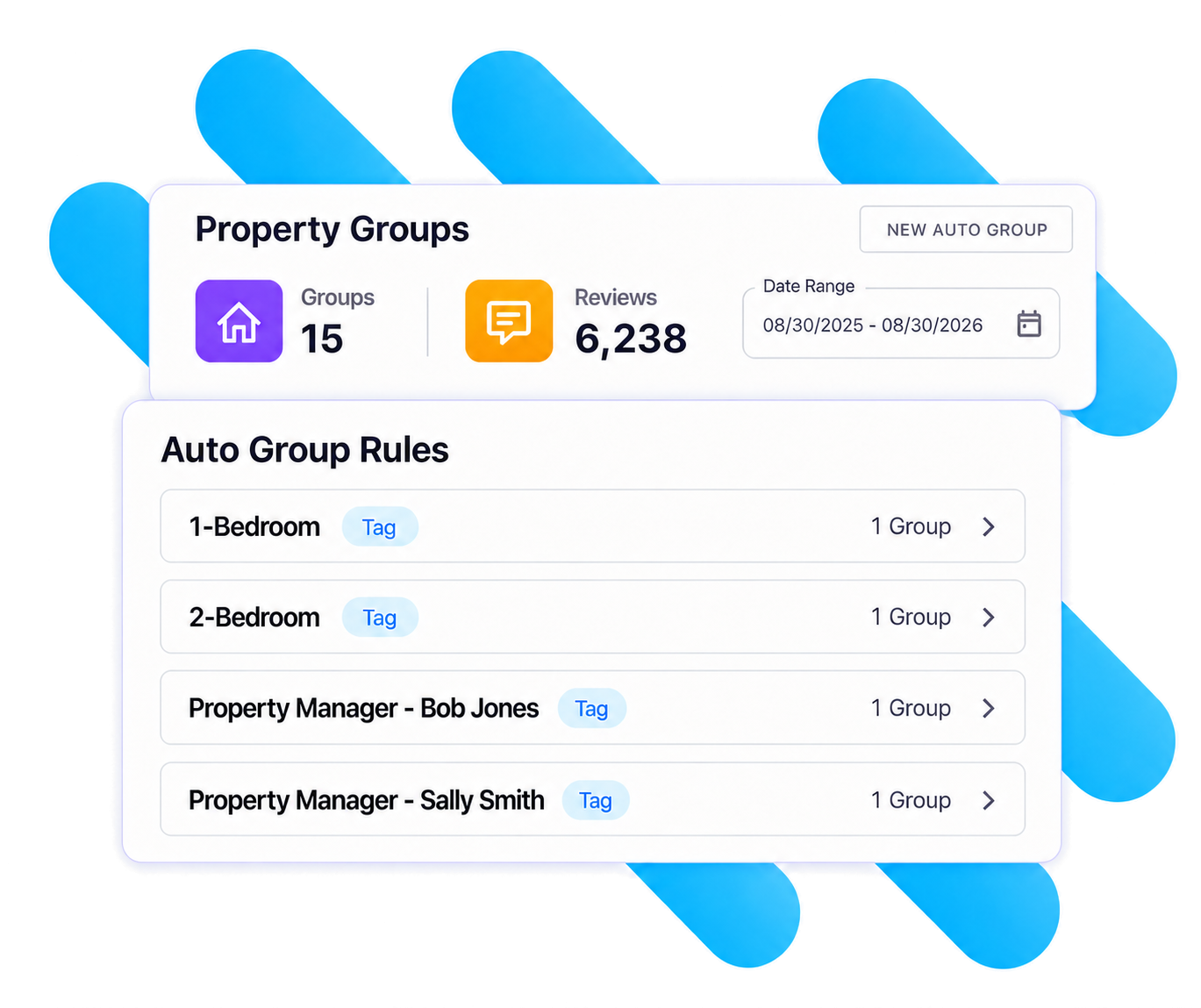
Today we're launching Auto Property Groups: groups that build and maintain themselves from your listing data. You choose what to group by; Sparrow Intel creates the groups and keeps their members up to date as your listings change.

Group by what already describes your portfolio

  • City, state/region, or both. Works with every connected PMS, using the address already on each listing. One group per market, created in a click. Choose "City + State/Region" when the same city name appears in more than one state or region.

  • Guesty custom fields and tags. Group by any custom field, either as a single group for one value or one group per distinct value. Or pick a tag to get a group of every listing carrying it.

  • Track custom fields, node hierarchy, unit roles and amenities. Group by unit custom fields like Brand, by any level of your node tree (one group per destination, for example), by who holds a unit role (one group per property manager), or by an amenity you use as a collection flag.

On a different PMS? City and state/region already work for you. If your PMS has fields or tags you'd like to group by the same way, reach out to us and tell us which. That's how we decide what to add next.

Set it once and it stays right

  • One group per value. A new value in your PMS becomes a new group automatically, so opening a new market doesn't mean another trip to Property Groups.

  • Membership follows your PMS. During your daily sync, properties that gain a city, field value or tag join the group, and properties that lose it leave.

  • Manual groups aren't going anywhere. Auto groups sit alongside the groups you build by hand. Delete a rule any time and choose whether to keep its groups as regular manual groups.

Getting started takes about a minute

  1. Head to Property Groups in the sidebar and click New Auto Group.

  2. Pick any property. It's only there to show you what you can group by and what its own values are. Choose a field, then "This value only" or "One group per value."

  3. Check the preview and click Save. Your groups appear right away.

For the full walkthrough, including what each Track field maps to, see the Auto Property Groups help guide.

Log in and try it on your biggest market. If you'd like help mapping your PMS setup to groups, just reply to this email.

Want to learn more?

If you'd rather walk through it together, or catch up on any of the other features we've recently released, book time with us. We'll help you set up your first auto group rules before the call ends.

P.S. Auto groups also work in Conversations and Chirp AI Voice. More on that soon, but if you'd like to learn about Conversations and Chirp AI Voice now, talk to us here.

August 25th, 2026

Hi there!

Your guest reviews are your best marketing - but until now, unless your team did custom development work, they've lived on Airbnb, Vrbo, Booking.com, Google, and more, not on the one site you actually own.

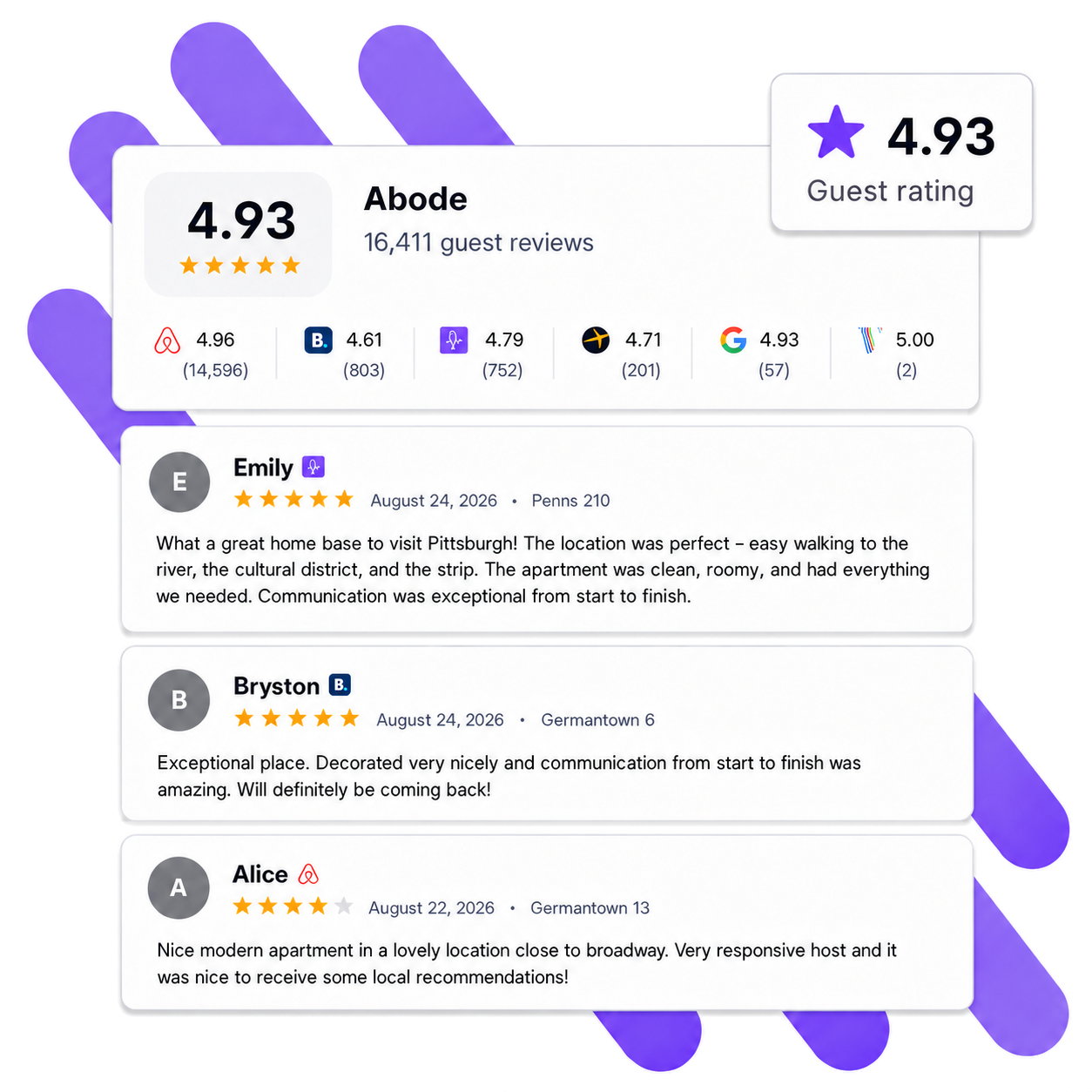
Today we're launching Review Widgets: embed your real guest reviews directly on your own website with a simple copy-and-paste snippet. No developer required.

Build it your way

  • Pulls from all your connected channels β€” Airbnb, Vrbo, Booking.com, Google, and direct guest feedback, all in one wall of social proof that updates automatically as new reviews come in.

  • Matches your brand β€” light or dark theme, your brand color, and full control over what's shown: review dates, channel badges, property names, host responses, and your overall rating.

  • You control the content β€” set a minimum star rating, choose which channels to include, exclude reviews containing specific keywords, hide rating-only reviews, and sort by newest or highest rated.

  • Scope it to fit β€” show reviews from all properties, a property group, or specific properties. Or drop one widget into your property page template and it automatically shows each property's own reviews.

  • Fast and lightweight β€” the widget is tiny and won't slow your site down or clash with your site's styling.

Getting started takes about five minutes

  1. Head to Review Widgets in the sidebar.

  2. Create a widget, customize the design and content, and watch the live preview update as you go.

  3. Copy the install snippet and paste it into your website.

That's it β€” your reviews are live on your site and stay up to date on their own.

Have a dev team and want even more customization? You can also pull your reviews programmatically through our Public API and build a fully custom display.

Log in to create your first widget, or if you'd rather walk through it together β€” or catch up on any of the other features we've recently released β€” book time with us.

February 6th, 2026

Turn guest feedback into action β€” automatically.

Sparrow Intel now connects directly to Asana, so cleaning issues, maintenance problems, and guest complaints identified in your reviews and messages can become trackable tasks in your team's workflow without any manual effort.

What it does

Automatic task creation powered by Chirp AI. When Chirp detects a cleaning or maintenance issue in a review, private feedback, or guest message, it can create an Asana task automatically β€” assigned to the right person, in the right project, with a link back to the original source. Set up rules with conditions like review sentiment, rating, or keywords, and let the system handle the rest.

Manual task creation from any review. Spot something that needs attention? Click "Create Task" on any review, choose your Asana project and assignee, and the task appears in Asana with full context and a direct link back to the review in Sparrow Intel.

How it works

Connect your Asana workspace in under five minutes using a Personal Access Token. Once connected, Sparrow Intel syncs your projects and team members automatically β€” no ongoing maintenance required.

From there, you can create tasks manually from any review, or set up rules to automate task creation when specific conditions are met. Every task links back to its source in Sparrow Intel so your team always has the full picture.

Key details

  • Tasks can be assigned to any member of your Asana workspace, or left unassigned

  • Projects sync automatically at least once per day

  • Personal Access Tokens don't expire β€” connect once and you're set

  • Tasks are managed in Asana after creation, with a link back to Sparrow Intel for context

Get started

Head to your Integrations tab in Sparrow Intel and click "Connect" next to Asana. Full setup instructions are available in our help center.

This integration is currently in beta. We'd love your feedback β€” let us know how it's working for your team.

December 16th, 2025

New

We’re excited to share our December 2025 changelog, highlighting the new features and enhancements we’ve rolled out over the past couple of months. These updates are shaped by your feedback and focused on making your daily workflow smoother, faster, and more connected across the tools you already use. πŸš€


Track and Manage Linked Tasks Directly Inside Sparrow Intel βœ…

A highly requested upgrade is now live. You can now see and follow every task that Sparrow Intel creates in your connected platforms.

Whether a task is created manually or triggered automatically by your rules, it now shows directly on the related review or insight. You can open it wherever you manage tasks (Breezeway or your PMS) with a single click and track it through to completion.

What this enables

  • Create tasks as usual using the Create Task button on any review or insight.

  • Automatically generate tasks through rules when Sparrow Intel detects issues like maintenance or cleanliness concerns.

  • See all created tasks inside Sparrow Intel alongside the original review or prediction.

  • Open tasks in the external platform with one click.

  • Track issues to completion without losing visibility.

This improvement closes the loop between Sparrow Intel and your operational tools, giving you end-to-end clarity without changing your workflow.


Export Reviews to Spreadsheet πŸ‘¨β€πŸ«

You can now download your filtered review inbox into a spreadsheet for deeper analysis, importing into BI tools, or sharing with your team.

Highlights

  • Export respects all filters in your review inbox

  • Download includes full review data

  • Public API remains available for advanced integrations

Read our full help guide here.


Issues by Property in Multi-Property Reports 🏘️

Multi-property reporting just became more actionable. Reports that cover several properties now break down issues by property, making it easier to see which homes need attention.


Properties and Property Groups Public API Endpoints πŸ–₯️

New endpoints are now live to help you sync or manage properties programmatically.

API docs: https://develop.sparrowintel.com/


New Rule Condition: Review Has Text πŸ’¬

You can now set different rule behavior based on whether a guest included written comments.

Example: Auto-reply only when a guest provides text.

This allows more nuanced automation and better control over your review workflows.


Properties/Property Groups Page Enhancements 🏠

  1. A new toggle on the Properties and Property Groups screens allows you to show all properties, even if they have no reviews in the selected timeframe.

    How to use: Click the three dots next to the date range and select β€œShow All.”

  2. You can now filter property-level summaries by OTA. This gives you more insight into which channels are generating specific types of reviews or trends.


Custom Review Reply Guidelines πŸ€–

You now have full control over the voice and tone of Chirp AI.

What you can do

  • Select from preset tone options

  • Create your own custom guidelines

  • Influence how Chirp AI writes replies moving forward

Custom guidelines can significantly change reply behavior, so we encourage testing.

More details at our help center guide here.


Superuser Support for Multi-Client Access πŸ¦Έβ€β™‚οΈ

If you manage multiple accounts, you can now access all your clients from a single login. This is ideal for revenue managers, agencies, and co-hosts.

Reach out if you would like this enabled for your team.


If you’d like help setting up any of these features or want to see them in action, we are always here to help!

May 23rd, 2025

New

We’re thrilled to roll out our new May 2025 features, packed with improvements you’ve been asking for! πŸš€πŸŒ»


Scheduled Reports

You can now schedule reports to be automatically emailed to your team members - even if they aren’t Sparrow Intel users. We call this feature Scheduled Reports.

Want to automatically send your cleaners a monthly summary of their performance, based on guest feedback? Done. Need to keep your owners updated on how their units are doing? Easy.

Reports can be scheduled for individual properties, property groups, cleaners, inspectors, or across all properties and categories.


Improved Support and Help Docs

Sparrow Intel’s new Help Center is live! Visit help.sparrowintel.com for how-to guides and product tips.

We’ve also launched a new AI-powered chatbot to help you get instant answers to product questions. Just click the chat icon in the bottom right corner of your screen.

And as always, our team is here if you need us!


New Reporting Features: Custom Date Ranges and More

Custom Date Ranges

You can now generate reports for any date range, not just a single month. This applies to all reports under the Reports tab and was one of our most requested features.

All Properties, All Categories Report

Easily create an exportable or scheduled report that covers all your properties and all review categories. The report is color-coded for quick visual insights at a glance.

AI-Generated Issues Summary

Cleaner and inspector reports now include an AI-powered summary of issues flagged during the review period. This summary highlights cleaning and maintenance concerns based on guest feedback, making automated team reporting even more powerful.


Updated Navigation

Our navigation has been restructured into clear categories to make it easier to browse and find what you need in Sparrow Intel.


As always, your feedback is invaluable, so share your thoughts with us! πŸ™Œ

February 24th, 2025

Improved

We're thrilled to present the latest update to Sparrow Intel, focusing on navigation, accessibility, and enhanced design for various devices.

Enhanced Navigation

  • Vertical Navigation Bar: Redesigned for a more seamless and user-friendly experience.
  • Collapsible Inbox Filter Panels: Streamlined design to optimize screen space.

Improved Layouts for Mobile and Tablet

  • Fine-tuned layout to ensure smooth functionality and aesthetics across devices.

We believe these updates will greatly improve your experience and workflow efficiency within Sparrow Intel. Your feedback is invaluable as we continue to innovate and refine our platform.

December 24th, 2024

New

We're thrilled to announce some exciting updates to Sparrow Intel that will enhance our overall user engagement and transparency.

New Public Roadmap

  • Transparent Development Insights: Access our public roadmap to stay informed about upcoming features and updates.
  • Ease of Navigation: The roadmap interface is designed to be both intuitive and informative.

Improved Feedback Mechanism

  • Feature Requests: Submit your feature recommendations seamlessly to influence our future developments.
  • Bug Reporting: Report any issues effortlessly with a user-friendly interface.

To explore these enhancements, visit feedback.sparrowintel.com or click the "Give us feedback" button directly within the Sparrow Intel platform.

We are committed to maintaining a responsive and collaborative relationship with our users. Your suggestions drive our innovative solutions.